Ads
Free course

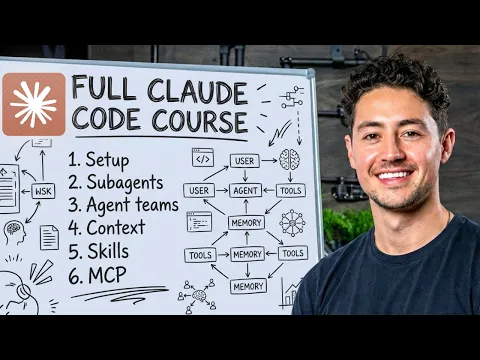
Claude Code Full Course: Build and Sell (4-Hour Masterclass)

A four-hour masterclass covering Claude Code from setup to deployment. Learn to install and configure Claude Code with IDEs like VS Code and Antigravity, structure projects with CLAUDE.md files, and build full web applications...

1 lesson 4h 10min total Free

Course overview

This four-hour masterclass by Nick Saraev provides a complete walkthrough of Claude Code, an AI-powered development tool for accelerating software creation. You will start with installation and configuration across integrated development environments like Antigravity IDE and Visual Studio Code, then move into structuring projects using CLAUDE.md files to optimize AI-generated code. The course demonstrates how to build complete web applications in minutes, implement advanced features like hooks and slash commands, and deploy sub-agents and agent teams for parallel autonomous work. It also covers Model Context Protocol, context window management, and token budget strategies before deploying finished applications to cloud platforms using Modal and GitHub.

Who this course is for

This course is designed for developers and technical entrepreneurs who want to integrate AI into their coding workflow to ship products faster. It suits beginners to Claude Code who have foundational programming knowledge and want to understand how to leverage its full capabilities, from basic setup to advanced agent orchestration. If you are looking to accelerate web application development, manage complex projects with autonomous sub-agents, or deploy AI-assisted code to production, this masterclass provides the structured path to get there.

How to study this sequence

This course is delivered as a single four-hour session on YouTube. Treat it as a hands-on workshop: code along with the installation and configuration steps using your own development environment. Pause to implement the CLAUDE.md structuring examples and test the slash commands as they are introduced. When the course reaches sub-agents, agent teams, and token optimization, experiment with small variations of the demonstrated projects to solidify your understanding before following the final deployment walkthrough with Modal.

What you should be able to do

By completing this course, you will be able to install and configure Claude Code in your preferred IDE, structure projects for optimal AI collaboration, and build fully functional web applications with Claude Code acceleration. You will understand how to implement hooks, slash commands, and specialized workflows, deploy autonomous sub-agents and agent teams for parallel development, and manage context windows for large-scale projects. You will also have deployed at least one cloud-based application using Modal.
~/about-course

What you learn in this Claude Code course

The main lesson in this course is "CLAUDE CODE FULL COURSE 4 HOURS: Build & Sell (2026)". It introduces Claude Code in a direct way, with enough context for you to understand the subject and decide what to practice next.

The main practice points are Install and configure Claude Code with various integrated development environments, Structure projects using CLAUDE.md files to optimize AI code generation, Build complete web applications in minutes using Claude Code acceleration and Implement advanced features including hooks, slash commands, and specialized workflows. Use this page to review the course proposal, check the key topics, and open the lessons in the recommended order.

What you will practice

  • Install and configure Claude Code with various integrated development environments
  • Structure projects using CLAUDE.md files to optimize AI code generation
  • Build complete web applications in minutes using Claude Code acceleration
  • Implement advanced features including hooks, slash commands, and specialized workflows
  • Deploy sub-agents and agent teams for parallel, autonomous development work
  • Manage context windows and token budgets for sustainable large-scale projects

Concepts covered

Claude Code Sub-Agents Agent Teams Model Context Protocol (MCP) Context Management Token Optimization Git Worktrees Slash Commands

Course lessons

1 tutorial organizado em sequência.

~/course-summary

Course summary

This Claude Code course works as a focused entry point. The main lesson, "CLAUDE CODE FULL COURSE 4 HOURS: Build & Sell (2026)", keeps the explanation in one complete path so you can follow the instructor and leave with a first practical direction.

During the course, the practical focus is on Install and configure Claude Code with various integrated development environments, Structure projects using CLAUDE.md files to optimize AI code generation, Build complete web applications in minutes using Claude Code acceleration and Implement advanced features including hooks, slash commands, and specialized workflows. These points help you watch with a goal instead of treating the lesson as a loose introduction.

The course also introduces important ideas such as Claude Code, Sub-Agents, Agent Teams, Model Context Protocol (MCP) and Context Management, which makes it easier to understand later tutorials and decide when each resource is useful.

~/study-plan

How to get more from this course

Who this Claude Code course is for

This advanced course is for learners who already understand the fundamentals of Claude Code and want to develop deeper technical or professional skills.

What you can do after finishing

By the end, you should be able to review the main idea of the course and practice Install and configure Claude Code with various integrated development environments, Structure projects using CLAUDE.md files to optimize AI code generation, Build complete web applications in minutes using Claude Code acceleration and Implement advanced features including hooks, slash commands, and specialized workflows with more confidence.

Recommended study order

Watch the lesson once for context, then return to the parts that show practical steps. A second pass usually helps turn the explanation into something you can repeat.

What to study next

After finishing the course, explore the Claude Code topic to find related tutorials and keep studying with more context.

~/course-faq

Course questions

Is this Claude Code course for beginners?

No. This course covers advanced Claude Code topics and is best suited to learners who already understand the fundamentals.

How many lessons are in this course?

This course currently has 1 lesson and about 4h 10min in total.

What should I do after finishing the course?

The best next step is to explore the Claude Code topic and choose a related tutorial that matches what you want to practice.

Is this course free?

Yes. This is a free course organized by CursoB so you can study Claude Code in a structured sequence.

Do I need previous experience to follow the course?

Yes. You should already understand the fundamentals of Claude Code before starting this advanced course.

Should I watch the lessons in order?

Yes. Start with the full lesson, then return to the practical parts when you want to repeat the process.

Can I use this course for practical projects?

Yes. Use the course as a practical reference to train Install and configure Claude Code with various integrated development environments, Structure projects using CLAUDE.md files to optimize AI code generation, Build complete web applications in minutes using Claude Code acceleration and Implement advanced features including hooks, slash commands, and specialized workflows and adapt the examples to your own projects.

Does this course include a certificate?

CursoB stopped issuing certificates for its own courses in May 2026. CursoB no longer offers completion certificates. Courses and tutorials remain free to study. If content is hosted on another platform, any certificate depends exclusively on the original author or platform rules.

Are the lessons updated?

CursoB periodically reviews the Claude Code catalog and may add, remove, or reorder lessons when better content is found.

Where can I find more content on this subject?

Explore the Claude Code topic to find related tutorials and complementary courses.