-
26
 Lesson 26 – n8n and AI Agents Automation Course
20min
Lesson 26 – n8n and AI Agents Automation Course
20min
-
27
Lesson 27 – n8n and AI Agents Automation Course
23min
-
28
Lesson 28 – n8n and AI Agents Automation Course
20min
-
29
Lesson 29 – n8n and AI Agents Automation Course
14min
-
30
Lesson 30 – n8n and AI Agents Automation Course
22min
-
31
Lesson 31 – n8n and AI Agents Automation Course
22min
-
32
Lesson 32 – n8n and AI Agents Automation Course
18min
-
33
Lesson 33 – n8n and AI Agents Automation Course
10min
-
34
Lesson 34 – n8n and AI Agents Automation Course
17min
-
35
Lesson 35 – n8n and AI Agents Automation Course
Current lesson
-
36
Lesson 36 – n8n and AI Agents Automation Course
10min
-
37
Lesson 37 – n8n and AI Agents Automation Course
9min




Summary
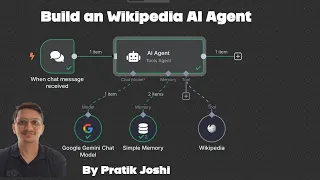
### Introduction to the AI-Powered Wikipedia Agent This lesson demonstrates how to construct an artificial intelligence agent specifically designed for Wikipedia research using n8n, a powerful no-code automation platform. The core functionality revolves around ingesting user queries, fetching relevant data from Wikipedia in real time, and generating insightful, concise answers. The agent is not merely a search tool; it incorporates advanced language processing capabilities provided by Google Gemini and the modular tool-chaining logic of LangChain. By the end of this setup, users will have a functional workflow that listens for questions, retrieves information from a vast knowledge base, processes it to ensure relevance, and delivers responses formatted with contextual emojis for enhanced readability. The architecture leverages n8n's visual workflow builder to connect distinct components, making sophisticated AI accessible without writing traditional code. This automation can serve as a foundation for more complex research bots, educational assistants, or content verification systems, illustrating the practical integration of large language models with external, updatable data sources to overcome the limitations of static training data.
### Configuring the n8n Workflow and LangChain Nodes The foundation of this research agent is an n8n workflow meticulously configured with nodes dedicated to AI processing. Central to this setup is the LangChain module integration within n8n, which provides a structured, chain-based approach to handling language model operations and tools. The workflow begins with a trigger node, such as a webhook or manual chat interface, which captures the user's natural language query. This query is then passed into a chain comprising an agent node that acts as the orchestrator. The agent node is configured to use a specific language model and a set of predefined tools. The configuration includes defining the system message or persona for the AI, essentially priming it to act as a helpful, emoji-using research assistant. Administrators must also configure output parsers to correctly structure the model's final response before sending it back to the user. This visual piping of data through LangChain nodes abstracts the complexity of prompt engineering and tool invocation, allowing builders to focus on the logical flow of information from user input to finalized research output.
### Implementing Real-Time Wikipedia Data Retrieval The agent's ability to provide accurate, up-to-date information hinges on its integration with the Wikipedia API, implemented as a tool within the LangChain framework. A dedicated Wikipedia tool node is added to the n8n workflow and made available to the AI agent. When the agent determines that a user's question requires factual context from Wikipedia, it autonomously decides to invoke this tool. The tool is configured to handle search queries and fetch page summaries, extracts, or specific sections based on the agent's interpretation of the required information. This is a critical step in the Retrieval-Augmented Generation (RAG) pattern, where the language model's reasoning is grounded in freshly fetched, verifiable sources. The connection to the live Wikipedia API ensures that the agent can pull data on current events, recent discoveries, and constantly evolving topics, mitigating the risk of hallucination or reliance on outdated internal knowledge. The parameters can be fine-tuned to limit the response length or specify the language of Wikipedia to query, ensuring efficient and relevant data retrieval for each user request.
### Optimizing with Google Gemini Language Models A core component powering the agent's reasoning and text generation is Google's Gemini family of language models, specifically optimized for speed and cost-effectiveness. The tutorial emphasizes the use of the Gemini 2.0 Flash model, integrated through a designated n8n node. This node requires an API key from Google AI Studio and is configured with parameters like temperature to control output creativity. Gemini acts as the "brain" of the operation, interpreting the user's intent, formulating tool calls to Wikipedia, synthesizing the retrieved information, and crafting the final response. The choice of Gemini 2.0 Flash is strategic, offering a balance of high-quality reasoning and low latency, making it ideal for real-time automation scenarios. The model's instruction-following capability is exploited by configuring the system prompt to mandate the inclusion of emojis, adding a layer of user-friendly formatting to the factual output. Performance tuning may involve adjusting the model version or request limits within the n8n credentials to align with project scale and budget requirements.
### Adding Conversational Context with Memory Management To transform the agent from a stateless question-answerer into a conversational partner with contextual awareness, a sliding window memory buffer is implemented. This memory management feature is added as a distinct node within the n8n workflow, typically linked to the LangChain agent. The sliding window approach retains a specified number of recent interactions—both user messages and AI responses—and passes this summarized history alongside the new query. This context prevents the agent from treating each question in isolation, enabling follow-up questions and more nuanced discussions about a topic. For example, a user can ask, "Who is the CEO?" after a previous exchange about a specific company, and the agent will understand the reference. The configuration involves setting the number of conversational exchanges to remember, known as the 'k' parameter. This method is efficient as it avoids an infinitely growing memory that could strain resources and cloud the model's focus, maintaining crisp, relevant interactions over multiple turns.
### Practical Applications and Future Expansions The completed n8n workflow unlocks a variety of practical applications and serves as a template for more ambitious AI automations. This Wikipedia agent can be deployed as a real-time research assistant for students, journalists, or analysts needing quick, sourced information. Its no-code nature democratizes AI development, allowing for rapid prototyping and customization by non-programmers within the Indian tech community and beyond. The architecture validates how easily a Retrieval-Augmented Generation system can be built using visual tools. Future expansions could include connecting additional tools, such as news APIs, databases, or calculators, through the same LangChain agent framework in n8n. One could also implement branching logic based on user intent or integrate the system into messaging platforms like Slack or Telegram. This lesson solidifies the foundational skills in agentic automation, setting a clear path toward building sophisticated, multi-functional digital assistants capable of complex cognitive tasks and continuous learning from structured external sources.
What you will learn
- Understand the lesson objective
- Apply the demonstrated workflow
- Validate the result in a practical project
Concepts covered
Technologies used
Chapters 5 markers
Next suggested video
Reviews
No reviews yet. Be the first to rate this lesson.