-
15
 Lesson 15 – n8n and AI Agents Automation Course
15min
Lesson 15 – n8n and AI Agents Automation Course
15min
-
16
Lesson 16 – n8n and AI Agents Automation Course
9min
-
17
Lesson 17 – n8n and AI Agents Automation Course
15min
-
18
Lesson 18 – n8n and AI Agents Automation Course
7min
-
19
Lesson 19 – n8n and AI Agents Automation Course
Current lesson
-
20
Lesson 20 – n8n and AI Agents Automation Course
13min
-
21
Lesson 21 – n8n and AI Agents Automation Course
2min
-
22
Lesson 22 – n8n and AI Agents Automation Course
13min
-
23
Lesson 23 – n8n and AI Agents Automation Course
21min
-
24
Lesson 24 – n8n and AI Agents Automation Course
24min
-
25
Lesson 25 – n8n and AI Agents Automation Course
10min
-
26
Lesson 26 – n8n and AI Agents Automation Course
20min



Summary
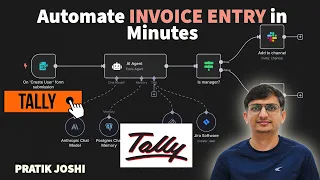
### Introduction to Automated Invoice Processing Manual invoice entry is a time-consuming and error-prone task that plagues accounting teams, freelancers, and small business owners. In this lesson, you discover how to harness the power of n8n, a no-code workflow automation tool, combined with AI agents to fully automate the ingestion, extraction, and posting of invoice data into Tally. The goal is to eliminate repetitive data entry, reduce human error, and create a scalable system that works silently in the background. By connecting document sources like email, Google Drive, or Dropbox, n8n can automatically detect new invoices, triggering workflows that handle everything from optical character recognition, or OCR, to final ledger posting without any manual intervention. This approach is perfect for those handling vendor bills, client invoices, or high-volume paperwork, as it transforms a traditionally tedious task into a seamless, code-free process.
### Setting Up Document Ingestion Triggers The first step in automating invoice entry is establishing reliable triggers that capture incoming invoices. n8n excels at integrating with common file storage and communication platforms. You can set up a trigger node that monitors a specific Gmail inbox for new attachments matching keywords like "invoice," "bill," or "statement." Similarly, a Google Drive or Dropbox watch node can scan a dedicated folder for newly added PDF or image files. The key is to create a passive, always-on listener that fires the workflow only when relevant documents appear. This eliminates the need to manually upload files, letting your team’s existing habits remain unchanged while the automation works behind the scenes. n8n’s modular design allows you to add filters—checking file extensions or sender email—to ensure only valid invoices proceed downstream. This trigger foundation ensures no invoice is missed, providing a complete audit trail from ingestion to booking.
### Extracting Data with AI-Powered OCR and Parsers Once an invoice is captured, the next challenge is extracting structured data from an unstructured document. In this lesson, you learn to use n8n’s integration with AI services, such as OpenAI’s vision models or dedicated OCR tools like Mindee, to read invoice fields. By feeding a PDF or image into an AI agent node, you can instruct it to identify and return key information: vendor name, invoice number, invoice date, due date, line items (description, quantity, unit price, total), subtotal, tax, and grand total. The tutorial demonstrates how to craft effective prompts that produce consistent JSON output, which is essential for reliable automation. You also explore fallback strategies, such as using regular expressions to clean up OCR outputs or setting up a manual review node for low-confidence extractions. This blend of AI intelligence and n8n’s utility nodes turns a messy stack of invoices into a clean, structured dataset ready for Tally.
### Mapping Data to Tally’s Ledger and Voucher Formats Pushing data into Tally requires a strict mapping of extracted fields to Tally’s accounting structure. The lesson explains Tally’s XML or JSON-based import formats, focusing on common voucher types like purchase invoices or journal entries. You will use n8n’s Function or Set nodes to transform the AI output into the exact ledger names, voucher numbers, and date formats Tally expects. For example, a vendor name like "Acme Corp" must match the corresponding ledger in Tally, and line items need to be broken down into separate inventory or expense ledgers. The video also covers handling multi-line items and tax calculations, ensuring that Tally’s debit and credit entries balance automatically. By building this mapping logic, you ensure that each automated posting maintains the integrity of your books, making it indistinguishable from a manually entered transaction.
### Adding Validation, Error Handling, and Approval Steps No financial automation is complete without safeguards. This tutorial emphasizes the importance of validation and error handling to keep your Tally data pristine. You learn how to insert conditional nodes that verify all mandatory fields are present and numeric values are within expected ranges. If a validation fails, the workflow can route to a human-in-the-loop approval step, sending a Slack or email notification with the problematic invoice attached. This allows a manager to quickly correct a mismatch or reject a suspicious entry before it hits Tally. Additionally, you explore implementing idempotency checks—comparing invoice numbers against a database of already-processed entries—to prevent duplicate postings. This layer of intelligence builds trust in your automation, enabling even risk-averse finance teams to adopt no-code workflows confidently.
### Scaling, Scheduling, and Optimization Tips For teams processing dozens or hundreds of invoices weekly, the lesson offers advanced strategies to scale your n8n automation. You learn to batch process multiple invoices using loop nodes or split arrays, reducing API calls and runtime. Scheduling workflows to run during off-peak hours prevents rate limits and ensures fresh data is posted by morning. The video also covers optimization techniques like caching vendor names via n8n’s data storage or employing parallel processing for faster throughput. Finally, you discover how to monitor workflow health with custom dashboards or error alerts, ensuring that as your business grows, your invoice automation remains robust and maintenance-free. These tips transform a single-use workflow into a production-grade accounting assistant.
What you will learn
- How to connect n8n with email, Google Drive, or Dropbox for automatic invoice ingestion
- Techniques to extract invoice fields using AI-powered OCR and parser nodes
- Methods for transforming and mapping extracted data to Tally’s ledger and voucher format
- Implementing validation, error handling, and approval gates to maintain clean books
- Scheduling, batching, and optimization strategies for scaling invoice automation
Concepts covered
Technologies used
Chapters 6 markers
- Introduction to automated invoice entry challenges
- Setting up document triggers from Gmail and cloud storage
- Extracting invoice data using AI OCR and prompt design
- Formatting extracted data into Tally-compatible JSON/XML
- Adding validation, duplicate checks, and approval nodes
- Scaling with batches, schedules, and monitoring tips
Next suggested video


Reviews
No reviews yet. Be the first to rate this lesson.