-
21
 Lesson 21 – n8n and AI Agents Automation Course
2min
Lesson 21 – n8n and AI Agents Automation Course
2min
-
22
Lesson 22 – n8n and AI Agents Automation Course
13min
-
23
Lesson 23 – n8n and AI Agents Automation Course
21min
-
24
Lesson 24 – n8n and AI Agents Automation Course
24min
-
25
Lesson 25 – n8n and AI Agents Automation Course
Current lesson
-
26
Lesson 26 – n8n and AI Agents Automation Course
20min
-
27
Lesson 27 – n8n and AI Agents Automation Course
23min
-
28
Lesson 28 – n8n and AI Agents Automation Course
20min
-
29
Lesson 29 – n8n and AI Agents Automation Course
14min
-
30
Lesson 30 – n8n and AI Agents Automation Course
22min
-
31
Lesson 31 – n8n and AI Agents Automation Course
22min
-
32
Lesson 32 – n8n and AI Agents Automation Course
18min

Summary
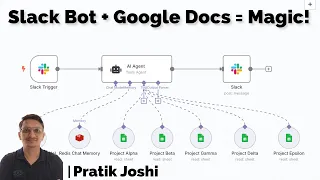
### Overview of the Intelligent Slack Bot Workflow In this lesson, we explore the creation of an intelligent Slack bot using an n8n workflow that seamlessly integrates multiple services to answer user queries. The bot operates within Slack, where users can mention **@bot** followed by a question. This triggers the n8n workflow, which scans data across multiple sub sheets in Google Docs to find relevant answers. The workflow is designed to provide accurate, context-aware responses by leveraging advanced memory management. The integration of Redis as a vector database for chat memory is a key highlight, as it stores conversation history and enables semantic search to improve interaction quality. This no-code solution demonstrates how to automate and enhance team communications without writing a single line of code.
### Core Components and Tools Used The workflow combines several powerful tools. **n8n** acts as the central automation engine, connecting Slack and Google Docs through pre-built nodes. **Slack** serves as the user interface, where team members interact with the bot by mentioning it. **Google Docs** is the data source, with multiple sub sheets structured to hold information like FAQs, product details, or internal knowledge bases. The workflow scans these sheets to extract answers based on the user's query. **Redis** is employed as a chat memory layer, using vector embeddings to store and retrieve conversation context, which allows the bot to remember previous interactions and provide more personalized responses. Although not explicitly listed, the **OpenAI API** is implied for generating embeddings and performing semantic searches, enhancing the relevance of answers by understanding query intent beyond keyword matching.
### Step-by-Step Workflow Design and Logic The n8n workflow begins with a **Slack trigger node** that listens for messages mentioning the bot. When activated, it captures the user's query and proceeds to the Google Docs integration. Here, a series of nodes extract data from multiple sub sheets, potentially using filtering or search operations to narrow down the relevant information. The query and extracted data are then processed through an AI agent or function node that formats the response. Simultaneously, the workflow interacts with Redis to fetch past conversation memory, embedding both the current query and chat history to refine the answer. The final response is sent back to Slack via a reply node, ensuring the user receives a timely and accurate answer. This design emphasizes modularity, making it easy to add more data sources or adjust the response logic as needed.
### The Role of Redis Chat Memory in Context Management Redis chat memory is crucial for elevating the bot from a simple query-answering tool to an intelligent conversational agent. By storing conversation history as vector embeddings in Redis, the workflow can perform **semantic searches** to recall relevant past exchanges. This context allows the bot to understand follow-up questions, resolve ambiguities, and avoid repetitive responses. For example, if a user asks "What are the project deadlines?" and then follows up with "How about for the next quarter?", the bot uses Redis to link the queries and provide a coherent answer. The integration uses the OpenAI API to embed messages, storing them in Redis for quick retrieval. This approach ensures that each interaction builds on the last, mimicking human-like conversation flow and significantly improving user satisfaction.
### Practical Applications and Use Cases This no-code automation is ideal for various business scenarios. It can serve as an internal **help desk bot**, answering employee questions about HR policies, IT support, or company benefits by pulling data from structured Google Sheets. For customer-facing teams, it can automate responses to common inquiries from a knowledge base, reducing manual effort. In project management, teams can use it to query task statuses or meeting notes. The Redis memory layer makes it particularly valuable for complex, multi-turn interactions where context matters, such as troubleshooting guides or onboarding assistants. This solution exemplifies how AI and automation can streamline workflows, improve information accessibility, and enhance collaboration within organizations using familiar tools like Slack and Google Docs.
### Key Takeaways and Next Steps for Learners By completing this lesson, you gain hands-on experience in building a sophisticated Slack bot with n8n, learning to integrate Google Docs as a data source and Redis for persistent chat memory. You'll understand how to design workflows that respond to real-time queries with context-aware accuracy. To extend your learning, experiment with adding more sub sheets, customizing the AI agent's prompts for specific domains, or integrating other APIs like Jira or Salesforce. The principles covered here lay a foundation for more advanced AI agent automation, where workflows can make decisions based on memory and external data. This knowledge empowers you to create efficient, no-code solutions that save time and enhance productivity in any collaborative environment.
What you will learn
- How to set up an n8n workflow triggered by Slack mentions
- Techniques for scanning multiple sub sheets in Google Docs to extract relevant data
- Methods to integrate Redis as a vector database for chat memory to maintain conversation context
- Understanding of using AI embeddings and semantic search for improving query responses
- Steps to build a no-code, intelligent Slack bot with context-aware answering capabilities
Concepts covered
Technologies used
Chapters 5 markers
Next suggested video


Reviews
No reviews yet. Be the first to rate this lesson.