-
01
 Lesson 1 – Claude Code 101
2min
Lesson 1 – Claude Code 101
2min
-
02
Lesson 2 – Claude Code 101
3min
-
03
Lesson 3 – Claude Code 101
2min
-
04
Lesson 4 – Claude Code 101
2min
-
05
Lesson 5 – Claude Code 101
3min
-
06
Lesson 6 – Claude Code 101
3min
-
07
Lesson 7 – Claude Code 101
3min
-
08
Lesson 8 – Claude Code 101
3min
-
09
Lesson 9 – Claude Code 101
Current lesson
Summary
The Hook System Architecture
Claude Code hooks represent a fundamental shift from probabilistic AI behavior to deterministic developer control. At its core, the hook system exposes lifecycle events that fire at specific moments during Claude Code's operations: before and after file modifications, before tool executions, and during session start and stop sequences. This architecture mirrors the event-driven patterns found in Git hooks or web framework middleware, giving developers precise interception points.
The hook mechanism operates through a structured JSON configuration that maps event names to shell commands. When a lifecycle event triggers, Claude Code spawns the configured command with a payload containing context about the current operation. The hook can then analyze this input, perform side effects like formatting files or sending notifications, and optionally return an exit code that tells Claude Code to proceed with or block the operation. This synchronous execution model means hooks run sequentially, making them predictable and debuggable.
Pre-FileModify and Post-FileModify Events
The most immediate practical hooks are the file modification events. The Pre-fileModify hook fires before Claude Code writes any changes to disk, receiving the proposed file path, original content, and new content in its payload. This creates a final inspection layer where teams can enforce coding standards that the AI might overlook. The Post-fileModify hook then activates after the write succeeds, which is the ideal moment for automatic code formatting.
A common pattern involves piping the modified file through tools like Prettier or Black. The hook script receives the file path, runs the formatter against it, and exits cleanly. Because Claude Code already applied the logical changes, the formatter just adjusts whitespace, line breaks, and syntactic sugar. This separation of concerns means the AI focuses on meaning while the hook handles presentation, resulting in cleaner diffs and less manual cleanup work after a coding session.
Tool Execution Control with Pre-ToolUse
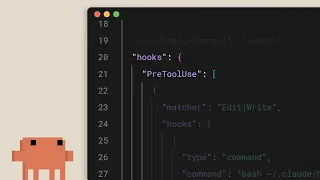
Beyond file operations, Claude Code can invoke tools like terminal commands, file read and write operations, and web search. The Pre-ToolUse hook activates before any of these invocations, giving teams a centralized security gate. The hook receives the tool name and complete input parameters. A security hook can then check whether the requested command matches an allowlist, whether it attempts to access sensitive paths, or whether it requires special escalation.
This capability transforms Claude Code from a general-purpose agent into a scope-constrained assistant appropriate for production environments. For example, a company might write a Pre-ToolUse hook that blocks any shell command containing `rm -rf` or `sudo`, or that restricts file reads outside the project root. The hook can return a non-zero exit code to cancel the operation and optionally provide a message explaining why the block occurred. This creates a policy layer separate from the AI's instruction following.
Session Lifecycle Hooks
The session hooks, including Session-start and Session-stop, address team onboarding and project initialization. A Session-start hook can check whether the developer has the required environment variables, installed dependencies, and correct API keys before Claude Code even begins interacting. If something is missing, the hook can print clear setup instructions and exit with an error, preventing confusing failures later.
Session-stop hooks provide cleanup, telemetry, or feedback loops. After a developer session ends, the hook can archive logs, update a shared knowledge base with what the team learned, or prompt for a quick satisfaction rating. These hooks run reliably because they are tied to explicit session boundaries, not to individual tool calls that might or might not execute during a session.
Building a Post-FileModify Auto-Formatter
A concrete implementation of the auto-formatter hook starts with defining the hook in the configuration. The developer specifies the event type, a descriptive name, and the command to run. The command receives the file path as standard input or as a JSON payload, depending on the configuration format. The hook script then inspects the file extension and selects the appropriate formatter: Prettier for JavaScript and TypeScript, Black for Python, or rustfmt for Rust.
The script must handle cases where the file type has no configured formatter gracefully, exiting with code zero to not disrupt the workflow. It should also respect project-level configuration files like `.prettierrc` or `pyproject.toml` so team preferences remain consistent. Running the formatter with the `--check` flag first can avoid unnecessary writes and keep the hook fast on files already correctly formatted.
Security Patterns in Pre-ToolUse Hooks
Designing effective security hooks requires a balance between protection and productivity. An overly restrictive hook frustrates developers; an overly permissive one provides no value. The safest pattern uses an explicit allowlist of known-safe commands rather than a denylist of known-dangerous ones. For example, the hook can approve `ls`, `cat`, `grep`, `find`, and project-specific script invocations while blocking everything else.
Context-aware hooks are the next evolution. Instead of using a static list, the hook can read a policy file from the repository, allowing each project to define its own safe commands. It can also vary rules based on the environment: stricter in CI or production contexts, more permissive in local development. The hook receives the working directory and can adjust behavior accordingly. Teams should version control these hook configurations alongside their code so that every developer operates under the same security baseline.
Sharing Hooks Across Teams
Claude Code hook configurations are JSON files designed for version control. A lead developer can define a standard set of hooks, commit them to the repository, and every team member who clones the project gets the same hooks automatically. This eliminates the need for each developer to configure their own safety nets and ensures consistent quality gates across the organization.
More advanced sharing patterns involve publishing hook scripts as packages or storing them in a shared internal registry. Teams that standardize on a monorepo can place hooks in a central directory and reference them from multiple projects. The hooks themselves can evolve independently of the Claude Code agent, allowing infrastructure teams to update security policies or formatting rules without touching application code. Version pinning of hook configurations prevents unexpected behavior from automatic updates.
Putting Deterministic Control into Practice
Hooks bridge the gap between AI-assisted coding and production-grade engineering practices. Where AI outputs can vary between sessions, hooks enforce the same rules every time. A Post-fileModify formatting hook will always apply Prettier; a Pre-ToolUse security hook will always block disallowed commands. This determinism matters in regulated industries, open-source projects with strict contribution guidelines, and any team that values predictable, reviewable outputs.
The mental model for hooks is not that of a prompt instruction, which the AI might interpret loosely or forget, but of a compiled policy that executes regardless of the model's state. As teams grow more comfortable with AI coding assistants, the hooks layer becomes the place where institutional knowledge, safety requirements, and style preferences get codified. New developers joining the project benefit from these guardrails immediately, reducing onboarding time and increasing codebase consistency.
What you will learn
- Configure lifecycle hooks for file modification and tool use events
- Implement automatic code formatting with Post-FileModify hooks
- Build security gates that block dangerous operations before execution
- Share hook configurations across teams via version control
- Design context-aware hooks that adapt rules per environment
Concepts covered
Technologies used
Chapters 5 markers
Next suggested video


Reviews
No reviews yet. Be the first to rate this lesson.