-
01
 Lesson 1 – Claude Code 101
2min
Lesson 1 – Claude Code 101
2min
-
02
Lesson 2 – Claude Code 101
3min
-
03
Lesson 3 – Claude Code 101
2min
-
04
Lesson 4 – Claude Code 101
2min
-
05
Lesson 5 – Claude Code 101
3min
-
06
Lesson 6 – Claude Code 101
3min
-
07
Lesson 7 – Claude Code 101
3min
-
08
Lesson 8 – Claude Code 101
Current lesson
-
09
Lesson 9 – Claude Code 101
3min
Summary
The core mechanism behind MCP
The Model Context Protocol, or MCP, is the connective tissue that transforms Claude Code from an isolated assistant into a fully integrated development partner. At its heart, MCP is an open standard that creates a secure channel between Claude Code and the external universe of tools and data sources your team relies on every day. Rather than forcing developers to copy, paste, and manually translate context between different platforms, MCP enables Claude Code to reach directly into services like Linear for issue tracking, GitHub for repository management, and specialized documentation servers for real-time reference material. This direct connection means Claude can read a Linear ticket, understand its acceptance criteria, pull the relevant code from GitHub, and begin working on a solution without the developer needing to provide exhaustive manual context for every interaction.
The protocol operates on a client-server architecture where Claude Code acts as the host client and the external services function as the MCP servers. Each server exposes a defined set of capabilities—tools, resources, and prompts—that Claude Code can discover and invoke during a session. The beauty of this standardized approach is that once a developer understands how to connect one MCP server, the pattern repeats for any compliant service. There is no need to learn a new integration pattern for each tool; the protocol handles authentication, request formatting, and data exchange uniformly. This dramatically lowers the cognitive overhead of working across multiple platforms simultaneously.
Adding your first server to the workflow
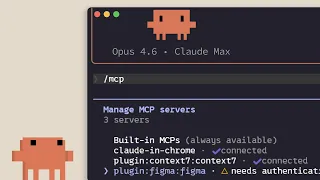
Getting started with MCP servers in Claude Code begins directly in the command-line interface. The process is streamlined to a single command for many common services: typing `/mcp add-server` followed by the target service name initiates the connection sequence. For instance, connecting to Linear requires only the command invocation and authentication with the user's Linear credentials. Once authenticated, Claude Code automatically discovers the available tools within that service—the ability to read issues, create new tasks, or update existing project items. This discovery mechanism ensures that Claude always knows what actions it can perform on behalf of the developer, preventing frustrating trial-and-error cycles where an assistant attempts operations that are not supported by the current integration.
The setup process respects security boundaries from the very first moment. Authentication tokens are stored locally in the developer's environment, never shared with Anthropic, and never transmitted to model training systems. This local-first security model means that sensitive credentials for GitHub repositories, Linear projects, and internal documentation servers remain under the developer's control at all times. Claude Code requests access through the established token but does not have independent access beyond what the token itself allows, maintaining alignment with existing organizational access control policies.
Scoping servers for team environments
Individual developers connecting their own tools is powerful, but real software development happens in teams. Claude Code addresses the collaborative challenge with a project-level configuration system that allows teams to define shared MCP servers. Using a `.mcp.json` file placed in the project root directory, repository maintainers can specify which MCP servers should be available to everyone working on that codebase. This configuration file travels with the project through version control, ensuring that every developer who clones the repository gets access to the same integrated tool set without manual setup steps.
The project configuration approach solves a critical onboarding problem. When a new developer joins a team, they typically need to be told which tools the team uses, how to connect them, and what conventions to follow. With MCP specified in the repository configuration, the new developer simply opens the project in Claude Code and the required server connections are automatically proposed. This codification of team tooling reduces the time from first clone to productive contribution significantly. The file format is straightforward JSON, making it both human-readable and easily modifiable through the same development workflow the team already uses for code changes.
Managing context costs effectively
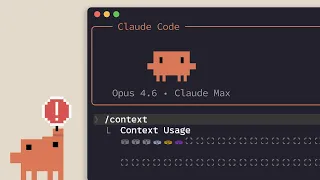
Every interaction with an external service through MCP consumes context—the data flowing into Claude's attention window during a coding session. Intelligent context management becomes essential to balance capability with cost efficiency. Claude Code provides developers with transparency into this consumption through built-in commands that expose exactly how much context each MCP server is utilizing. By running a status check, developers can see a breakdown of connected servers and their relative context footprints, enabling informed decisions about which connections to keep active during intensive coding sessions.
The scoping mechanism extends to context optimization as well. Teams can decide to connect only the minimally necessary set of MCP servers for a given project phase. During initial feature exploration, the Linear and documentation servers might be essential, while during pure implementation work, only the GitHub server remains active. This selective connectivity preserves context space for the actual code and conversation that matters most in the moment. The protocol does not impose a fixed context overhead per connection; the cost scales with actual usage, meaning a connected but idle server consumes negligible resources.
The developer experience with connected tools
When MCP servers are properly configured, the developer experience shifts from context-assembly to creative problem-solving. A typical workflow might begin with Claude reviewing a bug report in Linear, where it reads the issue description, reproduction steps, and any attached screenshots. Because the MCP connection provides this information directly, the developer does not need to summarize the issue manually. Claude then switches context to GitHub, examining the relevant code sections, git blame history for recent changes, and any associated pull requests. The assistant can trace the bug through the commit history, identifying when a regression was introduced and by which changeset.
The fluidity of this tool-hopping transforms what would normally be a series of manual context switches into a coherent analytical thread. Developers can ask higher-level questions because Claude handles the mechanical information gathering. Instead of asking about specific file contents, a developer can ask why a certain feature broke last week, and Claude will autonomously gather signals from version control, issue comments, and code structure to formulate an answer. This shifts the developer's role from information aggregator to decision-maker, focusing judgment and creativity where they add the most value.
Security and data residency considerations
Security-conscious teams will appreciate that MCP was designed with data boundaries as a first-class concern. All communication between Claude Code and MCP servers happens over the standard input and output streams of local processes—there is no network traffic unless the MCP server itself makes network requests to its backend service. This local-first architecture means that sensitive code never leaves the developer's machine through the MCP protocol itself. The protocol acts as a local orchestration layer, not a data forwarding service.
For organizations with strict data residency requirements, MCP servers can be configured to point at self-hosted instances of services rather than cloud-hosted versions. A GitHub Enterprise server or an internally hosted documentation platform can serve as the MCP endpoint, keeping all data within the organization's network boundary. The protocol is transparent about what information flows where, and the open specification allows organizations to audit their configuration at any time. This transparency is crucial for enterprise adoption where compliance reviews are a standard part of tool onboarding.
The extensibility promise of the open protocol
The long-term significance of MCP extends beyond the initial set of supported services. Because the protocol is an open standard, any tool vendor or internal platform team can build an MCP server that speaks the protocol. The community around MCP is already growing, with third-party developers creating connectors for databases, monitoring tools, and specialized domain services that Anthropic may never have prioritized. This ecosystem effect multiplies the value of learning MCP configuration once—every new server that joins the ecosystem instantly becomes accessible with the same conceptual model and configuration patterns.
For platform engineering teams within larger organizations, MCP represents an opportunity to codify internal tool access patterns. By building MCP servers that wrap internal APIs, platform teams can give development squads AI-powered access to proprietary systems without exposing those systems to direct user credentials or requiring developers to learn internal API details. Claude Code becomes the universal interface, while MCP ensures that the interface is consistent, secure, and maintainable across the organization's tool landscape.
What you will learn
- Understand the Model Context Protocol and how it connects Claude Code to external services
- Connect MCP servers like Linear and GitHub directly from the command line
- Configure project-level MCP settings with .mcp.json for team workflows
- Monitor and optimize context consumption across multiple MCP connections
Concepts covered
Technologies used
Chapters 6 markers
Next suggested video

Reviews
No reviews yet. Be the first to rate this lesson.