-
01
 Lesson 1 – Claude Code 101
2min
Lesson 1 – Claude Code 101
2min
-
02
Lesson 2 – Claude Code 101
3min
-
03
Lesson 3 – Claude Code 101
2min
-
04
Lesson 4 – Claude Code 101
2min
-
05
Lesson 5 – Claude Code 101
3min
-
06
Lesson 6 – Claude Code 101
3min
-
07
Lesson 7 – Claude Code 101
Current lesson
-
08
Lesson 8 – Claude Code 101
3min
-
09
Lesson 9 – Claude Code 101
3min
Summary
What context means for Claude Code
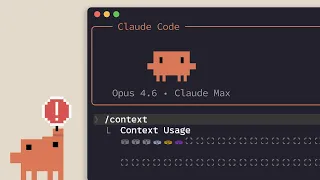
Context is the working memory of Claude Code. Every message, code snippet, and instruction you provide fills up a finite window that Claude uses to understand your project and respond helpfully. The larger this window grows, the more information Claude must process, which eventually affects performance and response quality.
Claude Code operates with a defined context limit. When the conversation approaches that limit, the tool becomes slower and less accurate. Managing this space actively is not optional for developers who want reliable sessions. It is a fundamental habit that separates effective AI-assisted coding from frustrating loops.
The difference between compacting and clearing
Claude Code provides two main commands for context management: /compact and /clear. They serve opposite purposes and understanding each is essential.
/compact summarizes the existing conversation into a condensed form and then continues the session. It preserves the essential knowledge, decisions, and code changes while discarding verbose details. This command is ideal when you are deep into a task and Claude needs a refreshed memory without losing the established context.
/clear completely wipes the conversation history and starts fresh. No summary is created. All prior exchanges, reasoning, and shared understanding vanish. Use /clear when you are switching to an entirely new task or when the accumulated context has become confusing or irrelevant. The lesson explains that this command should be used less frequently than /compact, precisely because it discards everything.
How full context degrades Claude Code performance
The video demonstrates the concrete effects of letting context fill up without intervention. As Claude Code approaches its maximum context capacity, several negative patterns emerge. Response generation slows down noticeably. The assistant starts forgetting earlier parts of the conversation. New instructions get misinterpreted because the most recent messages carry disproportionate weight.
This behavior is a direct consequence of how large language models allocate attention across long inputs. The practical takeaway is that developers must notice early warning signs, such as Claude repeating itself or asking about information already provided. These symptoms indicate that /compact or /clear is overdue.
Practical strategies for lean context windows
The lesson offers workflow tips that apply to everyday development sessions. First, break work into focused tasks and compact after completing each milestone. Second, avoid pasting huge chunks of documentation or logs unless strictly necessary. Third, use /compact proactively rather than waiting for context warnings to appear.
Another recommended approach is to structure conversations with an initial project summary, then compact often while retaining the core decisions in the compacted results. This creates a form of evolving documentation that Claude can access efficiently without re-reading original long-form content.
When to use /clear instead of /compact
There are clear signals that a complete reset is better than a summary. If you change repositories, move to a different feature, or realize that Claude has internalized incorrect assumptions, /clear is the correct choice. It prevents old biases from contaminating new work.
The lesson also warns against using /clear just because the session feels cluttered. Since compacting keeps what matters, it is usually the smarter first step. Reserve the nuclear option for genuine context switches that would make summaries misleading.
The role of context discipline in consistent coding
Consistent results with Claude Code depend heavily on context discipline. Developers who let sessions grow unchecked experience erratic behavior. Those who compact intentionally maintain a stable working environment where Claude Code remains fast, focused, and aligned with project goals.
The video frames this discipline as part of professional AI coding literacy. It is not an advanced trick but a basic hygiene rule, comparable to committing code frequently or keeping a clean terminal session. Building this habit early prevents most common frustrations reported by new users.
Summary and next steps in the Claude Code course
The lesson closes by reinforcing that /compact and /clear are the tools needed to preserve Claude Code's effectiveness over long sessions. Context management might seem trivial compared to generating code, but without it, all other skills degrade. The short duration of the video reflects how simple and high-leverage these commands are for anyone using Claude Code daily.
What you will learn
- Understand the concept of context window and its impact on Claude Code performance
- Differentiate between the /compact and /clear commands and their use cases
- Identify early signs that your context window needs compacting
- Apply strategies to keep conversations lean and productive
- Decide when a full context reset is more appropriate than a summary
Concepts covered
Technologies used
Chapters 6 markers
Next suggested video


Reviews
No reviews yet. Be the first to rate this lesson.