-
01
 VIBE CODING FULL COURSE: Gemini 3.1 + Antigravity (6 Hrs)
6h 23min
VIBE CODING FULL COURSE: Gemini 3.1 + Antigravity (6 Hrs)
6h 23min
-
02
The ONLY Google Gemini Tutorial You Need! How To Use Gemini Like a Pro in 18 Minutes
18min
-
03
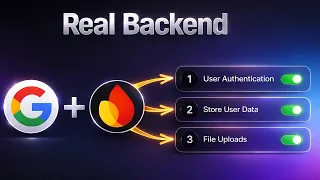
Stop Building Websites — Build REAL Web Apps with Google AI + Firebase
Current lesson
-
04
Google Gemini FULL COURSE 3 HOURS (Build & Automate Anything)
3h 17min
-
05
How I Build Apps With Google AI Studio 💡 Full AI Coding Tutorial
28min
-
06
Google AI Studio: Build, Test & Deploy a Real AI App (Full Guide)
14min
-
07
Master Google Ai Studio in 15 Minutes
17min
-
08
Google AI Studio Latest Update 💡 How I Build Full Apps (Tutorial & Tips)
15min
-
09
Google AI Studio – Full Tutorial 2026: How To Build an App
16min
-
10
Master NEW Google AI Studio in 23 Minutes
23min





Summary
From Static Websites to Full-Stack Applications
The gap between building a simple website and creating a real web application is significant. Websites display content; applications manage users, store data, and provide persistent experiences. This tutorial bridges that gap by teaching developers how to build a complete full-stack web app using Google AI Studio (Gemini) and Firebase. The result is not just another demo site, but a reusable architecture that can power any SaaS product, from productivity tools to content management systems. By understanding the core backend systems rather than memorizing a single project, learners gain the foundation to apply these patterns across multiple business ideas and niches.
Authentication as the Foundation Layer
User authentication forms the backbone of any modern application. The tutorial covers Firebase Authentication comprehensively, including email and password sign-up flows, Google Sign-In integration, and logout mechanisms. Email verification ensures only real users can access the system, preventing abuse and maintaining data integrity. The authentication layer acts as the gatekeeper, determining what each user can access and ensuring their data remains private. Implementing this correctly separates toy applications from production-ready systems that companies and investors expect. The video walks through the implementation step by step, making it clear how authentication state flows through the entire application and triggers UI updates accordingly.
Firestore for Persistent Data Storage
Once users authenticate, data must be stored securely and retrieved instantly. Firestore, Google's real-time cloud database, solves this problem elegantly. The tutorial demonstrates how to save user-specific data that persists across browser refreshes and logout sessions. Each user only sees their own data, enforced by security rules that prevent unauthorized access. This creates the illusion of a personal database for each user, a core feature of SaaS products. Firestore's real-time capabilities mean changes appear instantly across all connected clients, enabling collaborative features common in modern applications. Learning to structure data in Firestore and write secure backend logic without building a custom server is a critical skill for full-stack development.
File Uploads and User-Generated Content
Many applications require users to upload files—documents, images, or custom data. Firebase Storage integrates seamlessly with the authentication and database layers. Users can upload files directly from the web app, with each file automatically linked to the logged-in user. The tutorial covers displaying uploaded files in the UI and implementing delete functionality, creating a complete file management system. This pattern appears in countless production applications: cloud storage services, document collaboration tools, and media platforms. By understanding how to architect file uploads alongside user authentication and data storage, learners can build feature-rich applications that feel responsive and personal.
Building a Real SaaS Product Structure
The tutorial emphasizes the architectural difference between websites and SaaS applications. A real SaaS product has users, saved data, persistent state, and backend logic that enforces business rules. The example includes free plan limits, a common monetization pattern where authenticated users can only store a certain amount of data or perform limited actions. This teaches not just how to build features, but how to implement the logic that turns a free service into a sustainable business. The application reacts dynamically to authentication state, updating the dashboard with real data and enforcing access controls. This is what companies look for when evaluating technical talent and product maturity.
The Importance of Deployment and Production Readiness
A critical insight embedded in the tutorial is that Google Sign-In requires a deployed application with an authorized domain. Many developers build locally without realizing their app will break in production. The video emphasizes watching the deployment guide first, ensuring learners understand that deployment is not optional but essential. This reflects real-world development, where local environments often hide issues that surface only in production. By treating deployment as a first-class concern, the tutorial instills professional development practices. Learners discover why their authentication fails, why CORS errors appear, and how to configure Firebase security rules correctly—lessons that take months to learn through trial and error.
Reusable Patterns Across Projects
Instead of teaching a single demo app, the tutorial focuses on building reusable patterns. The authentication flow, database structure, and file upload system can be adapted to any niche or business model. A project management app, a portfolio platform, or an AI-powered SaaS—all share this fundamental architecture. By understanding the core systems rather than copying code, developers can apply these patterns flexibly. The video demonstrates how the same Firebase setup powers different applications, teaching the underlying principles rather than specific implementations. This approach accelerates development: instead of starting from scratch, developers leverage proven patterns and focus on unique features.
Bridging AI and Backend Infrastructure
Google AI Studio (Gemini) is mentioned as the AI component, though the tutorial primarily focuses on the backend infrastructure needed to make AI features production-ready. Many developers build AI demos that work locally but fail when deployed or when multiple users access them simultaneously. This tutorial ensures that AI-powered features are built on solid backend foundations. User data, authentication, and file storage create the context in which AI operates—generating personalized recommendations, analyzing user-uploaded documents, or maintaining conversation history. Understanding how to combine AI with proper backend infrastructure is what distinguishes experimental projects from viable businesses.
What you will learn
- Implement user authentication with Firebase using email, password, and Google Sign-In
- Build persistent data storage using Firestore with user-specific access controls
- Handle file uploads and management in Firebase Storage linked to user accounts
- Deploy full-stack applications and configure production-ready security rules
- Create SaaS-like features including free plan limits and data persistence
- Architect real-time, responsive UIs that react to authentication state and database changes
Concepts covered
Technologies used
Chapters 8 markers
- Introduction: Website vs Real Web App
- Setting up Firebase project and authentication
- Email and password sign-up implementation
- Google Sign-In integration
- Firestore data storage and user-specific collections
- File uploads with Firebase Storage
- Building the dashboard and UI state management
- Deployment considerations and production setup
Next suggested video


Reviews
No reviews yet. Be the first to rate this lesson.