-
01
 VIBE CODING FULL COURSE: Gemini 3.1 + Antigravity (6 Hrs)
6h 23min
VIBE CODING FULL COURSE: Gemini 3.1 + Antigravity (6 Hrs)
6h 23min
-
02
The ONLY Google Gemini Tutorial You Need! How To Use Gemini Like a Pro in 18 Minutes
18min
-
03
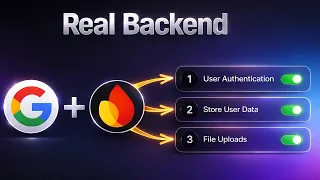
Stop Building Websites — Build REAL Web Apps with Google AI + Firebase
23min
-
04
Google Gemini FULL COURSE 3 HOURS (Build & Automate Anything)
3h 17min
-
05
How I Build Apps With Google AI Studio 💡 Full AI Coding Tutorial
Current lesson
-
06
Google AI Studio: Build, Test & Deploy a Real AI App (Full Guide)
14min
-
07
Master Google Ai Studio in 15 Minutes
17min
-
08
Google AI Studio Latest Update 💡 How I Build Full Apps (Tutorial & Tips)
15min
-
09
Google AI Studio – Full Tutorial 2026: How To Build an App
16min
-
10
Master NEW Google AI Studio in 23 Minutes
23min









Summary
Understanding Google AI Studio for App Development
Google AI Studio has emerged as a powerful platform for developers and non-coders alike to leverage advanced language models for application building. In this comprehensive tutorial, the creator demonstrates how Gemini 2.5 Pro—one of the most capable large language models available—can be used not only to write code but also to learn programming concepts and debug applications in real-time. The platform offers a free tier that makes it accessible to anyone interested in exploring AI-assisted development, eliminating financial barriers that traditionally existed in software development. For those without extensive coding backgrounds, Google AI Studio represents a paradigm shift, enabling individuals to transform ideas into functional applications by collaborating with an AI assistant that understands context, maintains conversation history, and can iterate on solutions based on feedback.
Ideating and Planning Your Application
The foundation of successful app development lies in clear planning and ideation. The creator demonstrates the importance of establishing a solid roadmap before diving into code, using the example of building a custom idea inbox application designed to integrate with Obsidian, a popular note-taking platform. During the planning phase, developers should define the app's core functionality, identify the target users, and outline the user experience flow. This step involves articulating the problem the app solves and determining whether the solution aligns with existing tools or requires a custom build. By investing time in planning and research, developers can improve the AI's understanding of the project scope, leading to better code generation and fewer iterations later. Google AI Studio allows developers to maintain this roadmap within the platform, creating a persistent context that guides subsequent development sessions.
Mastering Prompt Engineering and Context Strategy
Prompt engineering has become a critical skill in AI-assisted development, and context engineering—the practice of providing comprehensive background information to the AI—is equally vital. The tutorial emphasizes that the quality of code generation directly correlates with the clarity and completeness of prompts provided to Gemini 2.5 Pro. Developers should structure prompts to include specific requirements, desired outcomes, constraints, and examples of expected behavior. Context strategy involves maintaining detailed documentation of the app's architecture, previously written code, and design decisions, which can be referenced in subsequent conversations. This approach, sometimes called vibe coding, relies on building a rapport with the AI where the assistant understands not just individual requests but the overall vision and constraints of the project. By providing sufficient context—whether through detailed prompts, linked documentation, or chat history—developers can dramatically improve the relevance and quality of AI-generated solutions.
Building the Minimum Viable Product
Once planning is complete, the actual coding phase begins with building the minimum viable product (MVP). The creator demonstrates how to use Gemini 2.5 Pro to generate the initial codebase, starting with the core functionality and gradually expanding features. During this phase, the AI assists in scaffolding the application structure, writing functions, and implementing the essential features that define the app's value proposition. The MVP approach—focusing on a small set of features that solve the core problem—allows developers to validate their idea quickly and gather user feedback. Gemini 2.5 Pro can generate boilerplate code, handle repetitive tasks, and suggest architectural patterns, allowing developers to focus on decision-making rather than tedious coding. The AI's ability to understand context across long conversations means it can maintain consistency in coding style, naming conventions, and architectural decisions throughout the development process.
Documentation and Progress Tracking
Maintaining clear documentation throughout the development cycle ensures continuity between coding sessions and facilitates debugging and feature additions later. The creator emphasizes the importance of tracking the app's evolution, including completed features, known limitations, and planned enhancements. Documentation serves multiple purposes: it helps the developer remember decisions made in previous sessions, provides context for the AI in future interactions, and creates a valuable reference for anyone reviewing or contributing to the project. By keeping a dedicated document that outlines the app's structure, API endpoints, component hierarchy, and feature status, developers can quickly orient Gemini 2.5 Pro to the current state of the project. This practice becomes increasingly important as apps grow in complexity and session intervals extend. Linking chat history and roadmap documents within Google AI Studio creates a searchable knowledge base that accelerates subsequent development phases.
Version Control and Collaborative Development
Integrating GitHub for version control represents a critical step in transitioning from personal projects to production-ready applications. The tutorial covers how to use GitHub alongside Google AI Studio, ensuring that code changes are tracked, reversible, and shareable. Version control enables developers to experiment with new features in branches, merge changes systematically, and maintain a history of how the application evolved. When working with AI-generated code, version control becomes even more valuable, as it allows developers to test multiple AI-generated solutions and cherry-pick the best approaches. GitHub integration also facilitates deployment pipelines and collaborative development, where multiple people or even the AI itself can propose changes. By committing code regularly and writing meaningful commit messages, developers create a historical record that contextualizes decisions and aids future debugging efforts.
Debugging and Iterative Refinement
No application emerges perfectly from initial development; debugging and iterative refinement are essential aspects of the development process. Gemini 2.5 Pro excels at identifying bugs when provided with error messages, unexpected behavior descriptions, and relevant code snippets. The creator demonstrates how to approach debugging systematically: isolate the problem, provide the AI with sufficient context, and evaluate proposed solutions. The iterative nature of AI-assisted development means that multiple rounds of refinement often occur as new features are added or edge cases are discovered. Developers should view this process not as a setback but as a normal part of development, where each iteration brings the application closer to the desired state. The AI's ability to learn from previous debugging sessions means that similar issues in different parts of the codebase can be resolved more quickly, as the assistant already understands the project's conventions and architecture.
Deployment and Scaling to Production
Once the MVP is functional and tested, deployment becomes the next frontier. The tutorial introduces Google Cloud Run as a deployment platform, allowing developers to share their applications with real users. Deploying to production involves considerations beyond basic functionality: security, performance, scalability, and monitoring. Gemini 2.5 Pro can assist in writing deployment scripts, configuring containerization, and setting up environment variables. The creator demonstrates how the same collaborative approach that worked for development continues through deployment, with the AI helping to troubleshoot deployment-specific issues and optimize the application's performance in production. By deploying early and gathering real-world user feedback, developers can make informed decisions about feature priorities and architectural changes. This full-stack approach—from ideation through deployment—leverages Google AI Studio, GitHub, and Google Cloud Run as an integrated toolkit for modern application development.
Extending Functionality with Generative AI
A compelling aspect of modern app development is the ability to embed generative AI features directly into applications. The creator demonstrates adding Gemini 2.5 Pro capabilities to the idea inbox app, allowing users to leverage the same AI that built the application for their own productivity. Implementing generative AI features requires obtaining API credentials, understanding rate limits and costs, and thoughtfully integrating AI capabilities into the user experience. By building on Gemini's capabilities within their applications, developers create products that offer intelligent assistance, personalization, and automation. The tutorial covers obtaining a Google AI Studio API key and integrating it into the application, demystifying what can seem like a complex integration process. This approach represents the future of application development, where built-in AI assistance enhances user experience and differentiates products in competitive markets.
What you will learn
- Leverage Google AI Studio and Gemini 2.5 Pro for full-stack application development
- Master prompt engineering and context strategies for consistent, high-quality AI code generation
- Plan, build, and deploy functional mobile apps without extensive prior coding experience
- Integrate version control with GitHub and manage AI-generated code professionally
- Deploy applications using Google Cloud Run and add generative AI features to apps
Concepts covered
Technologies used
Chapters 11 markers
- Intro to App Building With Google AI Studio
- Today's Outline & Goals
- Google AI Studio Brief Overview
- Step 1: Plan & Roadmap Your App Idea
- Step 2: Iterate & Ground With Research
- Step 3: Build The App With AI Coding
- Step 5: Versioning With GitHub
- Step 6: Adding More Features
- Step 7: Debugging New Features
- Deploy To Google Cloud Run
- Adding Generative AI Features
Next suggested video


Reviews
No reviews yet. Be the first to rate this lesson.