-
23
 Lesson 23 – n8n and AI Agents Automation Course
21min
Lesson 23 – n8n and AI Agents Automation Course
21min
-
24
Lesson 24 – n8n and AI Agents Automation Course
24min
-
25
Lesson 25 – n8n and AI Agents Automation Course
10min
-
26
Lesson 26 – n8n and AI Agents Automation Course
20min
-
27
Lesson 27 – n8n and AI Agents Automation Course
Current lesson
-
28
Lesson 28 – n8n and AI Agents Automation Course
20min
-
29
Lesson 29 – n8n and AI Agents Automation Course
14min
-
30
Lesson 30 – n8n and AI Agents Automation Course
22min
-
31
Lesson 31 – n8n and AI Agents Automation Course
22min
-
32
Lesson 32 – n8n and AI Agents Automation Course
18min
-
33
Lesson 33 – n8n and AI Agents Automation Course
10min
-
34
Lesson 34 – n8n and AI Agents Automation Course
17min


Summary
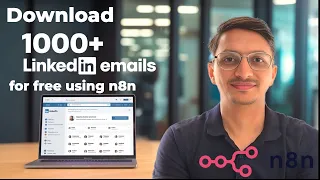
### What You Will Build In this lesson, you gain hands-on experience constructing an advanced n8n workflow that transforms how you approach B2B lead generation. The core objective is to automate the entire process of finding professional email addresses on LinkedIn, moving away from manual copy-pasting and time-consuming research. You will build a system that extracts raw contact data and then intelligently filters and enriches it. The final deliverable is a store of curated, industry-specific leads complete with customized cold email drafts, ready for your review and dispatch. This workflow acts as your virtual outreach assistant, turning a traditionally tedious task into a streamlined, repeatable automation.
### The Automation Workflow Architecture The workflow follows a logical sequence of actions, each managed by a specific set of n8n nodes. You start by configuring the HTTP Request node to interact with a data extraction service via API, acting as your targeted LinkedIn scraper. This node sends a payload specifying your search criteria, such as industry and professional roles. The response, a raw JSON object containing potential leads, then enters a processing pipeline. A key component is the Item Lists node, which is used to split the batched data into individual items, allowing for granular control over each lead. Subsequent nodes clean, filter, and transform this data to ensure only high-quality, relevant contacts proceed to the final, crucial stage: AI-powered email generation.
### Data Refinement and Filtering Techniques Raw scraped data is rarely perfect. This section of the lesson focuses on the critical steps that separate a messy list from a high-quality lead repository. You learn to use the Function node to write custom JavaScript code for data transformation. For instance, you handle the common issue of duplicate names and empty LinkedIn profile URLs by implementing logic that flags and removes them. A Set node is then employed to rename and organize fields, ensuring your data structure is clean and consistent for later use. The workflow also integrates a Filter node, which you configure to apply strict criteria, such as removing any contact lacking an email address, which is essential for a successful email campaign.
### Crafting Personalized Emails with AI The flagship aspect of this automation is the integration of an AI agent to generate natural, personalized email bodies. You will configure an OpenAI node, providing it with a system prompt that defines the assistant's role as a savvy business development representative. The prompt is engineered to guide the AI in crafting emails that are concise, respectful, and value-driven, avoiding a pushy sales tone. Crucially, you learn to feed dynamic data from each lead—such as their full name and specific industry—into the AI's user message, so each generated email body is uniquely tailored. This step enhances the potential for building genuine connections and improving cold outreach response rates.
### Scaling and Practical Implementation Strategies The lesson goes beyond the core build to address practical implementation and scaling. You receive guidance on rate limits and responsible usage of automation platforms, emphasizing the responsible approach to data extraction to avoid service interruptions. A significant practical advantage is the walkthrough for creating a Google Sheets integration. You learn to use the Google Sheets nodes to not only append your enriched, email-ready leads to a spreadsheet but also to read from an existing sheet. This enables you to manage and reuse large lead lists efficiently, integrating your automated workflow into a broader, manageable business process for sustained outreach campaigns.
### Key Takeaways and Immediate Applications By completing this lesson, you have done more than just follow a script; you have learned a fundamental pattern for n8n-driven data acquisition and AI-assisted communication. The skills of chaining HTTP requests for scraping, using Function and Filter nodes for data hygiene, and invoking an AI model for content generation form a versatile foundation. You can immediately apply this template to target any niche by simply adjusting the industry and role parameters in the initial scraping request. The ability to systematically generate a list of potential contacts pre-loaded with personalized outreach messages is a powerful competency for business growth, sales acceleration, or job prospecting.
What you will learn
- Configure an HTTP Request node to scrape targeted LinkedIn lead data via an external API service
- Process and split raw JSON data using n8n's Item Lists and Function nodes for individual lead handling
- Apply data cleaning techniques with JavaScript in Function nodes to remove duplicates and empty fields
- Use Filter and Set nodes to refine and structure lead data, keeping only contacts with valid email addresses
- Integrate an OpenAI node as an AI agent to generate personalized, industry-specific cold email bodies for each contact
- Output enriched lead lists to Google Sheets for campaign management and implement practical scaling considerations
Concepts covered
Technologies used
Chapters 6 markers
- Introduction to the LinkedIn scraping and email automation workflow
- Setting up the HTTP Request node to scrape targeted lead data via API
- Processing raw data with Item Lists and cleaning duplicates with a Function node
- Filtering for valid emails and structuring data with Set and Filter nodes
- Integrating the AI agent (OpenAI node) to generate personalized cold emails
- Outputting final data to Google Sheets and discussing scaling best practices
Next suggested video


Reviews
No reviews yet. Be the first to rate this lesson.