More from this course
OpenAI Codex Full Course: AI Coding Agent Tutorial with Python Examples
Lesson 7 of 7-
01
 Lesson 1 – OpenAI Codex Full Course: AI Coding Agent Tutorial with Python Examples
10min
Lesson 1 – OpenAI Codex Full Course: AI Coding Agent Tutorial with Python Examples
10min
-
02
Lesson 2 – OpenAI Codex Full Course: AI Coding Agent Tutorial with Python Examples
41min
-
03
Lesson 3 – OpenAI Codex Full Course: AI Coding Agent Tutorial with Python Examples
21min
-
04
Lesson 4 – OpenAI Codex Full Course: AI Coding Agent Tutorial with Python Examples
34min
-
05
Lesson 5 – OpenAI Codex Full Course: AI Coding Agent Tutorial with Python Examples
27min
-
06
Lesson 6 – OpenAI Codex Full Course: AI Coding Agent Tutorial with Python Examples
30min
-
07
Lesson 7 – OpenAI Codex Full Course: AI Coding Agent Tutorial with Python Examples
Current lesson
Summary
Automating Code Quality with AI
Maintaining high code quality is a fundamental challenge in software development, especially when teams grow and pull requests multiply. Traditional manual code reviews are invaluable but can become a bottleneck. They require significant time from senior developers, and their effectiveness can vary based on reviewer fatigue. This lesson introduces a paradigm shift by showing how to transform an AI model from a simple code generator into an active participant in the software development lifecycle, specifically as an automated reviewer. The core idea is to embed an AI agent directly into a GitHub repository to analyze every proposed change automatically, providing consistent, immediate feedback before a human even looks at the code. By leveraging OpenAI’s Codex, a model adept at understanding and generating code, you can build a system that checks for logic errors, style violations, and potential bugs, effectively adding a tireless, experienced reviewer to every single pull request.
The process fundamentally reimagines the continuous integration (CI) pipeline. Instead of just running tests and linters, the CI workflow now includes a step that invokes an AI agent to perform a contextual code review. This lesson demonstrates how to connect the dots between GitHub’s event-driven architecture and a Python script that acts as an intermediary with the Codex API. The script grabs the code diff, constructs an intelligent prompt asking for specific, actionable feedback, and then posts that feedback directly back to the pull request conversation. This automated workflow ensures that no code change goes unexamined, lowering the barrier to high-quality reviews and freeing up human developers to focus on more complex architectural decisions and strategic problem-solving.
Building the GitHub-Codex Connection
The technical foundation of the project rests on GitHub Actions, which is the automation engine that triggers the review process. When a developer opens or updates a pull request, a predefined GitHub Actions workflow file springs into action. This file defines the server environment and the sequence of commands to run. The central piece is a Python script, which becomes the brain of the operation. This script is not merely a connector; it is a sophisticated translation layer. It must authenticate with both GitHub and OpenAI, fetch the raw diff of the pull request, and sanitize this data into a format that Codex can effectively process. The diff, while a standard format for developers, is optimized into a clear, structured prompt for the AI.
The lesson delves into the specifics of crafting this prompt. The instructions given to Codex are crucial for obtaining useful feedback. Instead of a generic “review this code,” the prompt is engineered to guide the AI to act as a meticulous senior developer. It is instructed to focus on specific categories like potential bugs, security vulnerabilities, performance issues, and adherence to best practices. The Python script unpacks the response from the OpenAI API and formats it into a clean, readable comment. Finally, it uses the GitHub API to post this AI-generated review as a comment on the pull request, creating a seamless experience where the AI’s insights appear alongside human discussion. This direct integration makes the AI feedback an organic part of the development conversation.
Diving into the Python Script Anatomy
A significant portion of the lesson is dedicated to a step-by-step breakdown of the Python script, making it understandable even for those who are not experts in the OpenAI ecosystem. The script begins with standard setup: importing necessary libraries like `os`, `requests`, and `openai`, and securely loading API keys and tokens from GitHub Secrets. Security is a first-class concern; the lesson emphasizes that API keys must never be hardcoded and demonstrates the proper use of GitHub’s encrypted secrets to manage sensitive information within a CI/CD environment. The script then defines its core functions: one to get the pull request’s diff from the GitHub API, another to construct the prompt and call the OpenAI API, and a third to post the resulting comment back to GitHub.
A particularly practical aspect of the tutorial is its handling of the review commentary. The instructor shows how to parse the potentially long and unstructured response from the AI and extract only the relevant feedback. The lesson also covers rudimentary but effective techniques for error handling. Network requests to external APIs can fail, and the script includes logic to gracefully handle such failures without crashing the entire CI run. By the end of this section, the logic is transparent: the script acts as a deterministic pipeline that takes a PR event, processes it through a non-deterministic AI model, and delivers a deterministic outcome—a structured comment on the pull request. This clarity demystifies what could otherwise seem like a complex black-box operation.
CI/CD Integration and Real-World Testing
With the Python script ready, the focus shifts to embedding it within a GitHub Actions workflow. The lesson provides a clear, copy-able YAML configuration for the workflow. It specifies that the action should be triggered on pull request events targeting the main branch, configures the Python environment, installs dependencies, and runs the script. The instructor explains each line of the YAML file, demystifying the syntax for triggers, jobs, and steps. This hands-on approach ensures that learners are not just given code but understand the orchestration logic behind it. The demonstration brings the entire system to life with a real-world test. The instructor creates a pull request containing deliberate code issues, such as a poorly named variable or a potential null reference error.
Seeing the automated review in action is the pivotal moment of the lesson. Within moments of pushing the code, the GitHub Actions workflow runs, and the Codex-powered bot posts a detailed review on the pull request. The AI’s comment accurately identifies the introduced issues and often suggests corrected code snippets. This live test validates the entire setup and proves the immense value of the integration. It turns a theoretical concept into a tangible tool that immediately starts contributing to a project’s code quality. The speed and accuracy of the feedback loop are highlighted as a game-changer for teams looking to enforce coding standards consistently without adding manual overhead to their review processes.
Expanding to Automated Releases and Testing
The lesson doesn’t stop at pull request reviews. It expands the scope to demonstrate how the same underlying technology can be applied to other parts of the CI/CD pipeline, creating a more comprehensive AI-assisted development environment. One key extension is automated release note generation. Using a similar mechanism, a GitHub Action can be triggered upon a new release creation. A Python script can then gather all the commits and pull requests merged since the last release, formulate a prompt for Codex that asks for a human-readable, categorized changelog, and automatically publish this as the release description. This turns a tedious, often-neglected task into a fully automated, high-quality process.
Furthermore, the lesson explores how Codex can be integrated with automated testing. The instructor discusses how AI can review test files and even suggest generating new tests based on the code changes in a pull request. For example, if a developer modifies a function without updating its corresponding unit tests, the AI reviewer can detect this disparity and recommend specific test scenarios. This proactive assistance helps maintain a healthy test suite and catches edge cases that a developer might miss. By showing these extended use cases, the lesson paints a complete picture of an AI-powered development workflow where the AI acts as a guardian of quality at multiple gates, from every code change to the final product release.
Practical Setup and Course Summary
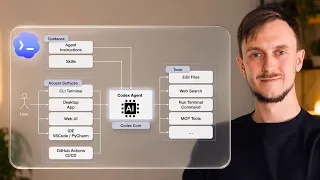
The final segment of the lesson provides a grounded summary of the technical workflow, often referencing the OpenAI documentation for the Model Context Protocol (MCP) to show how these integrations are the building blocks for more complex agentic behaviors. The instructor reviews the entire architecture: a GitHub event triggers an Action, which runs a Python script that orchestrates the AI call and processes the result. This review solidifies the mental model for the student. The complete codebase is made available on GitHub, allowing learners to clone the repository, set up their own API keys, and have an automated AI reviewer running in minutes. The lesson emphasizes the practical value of this skill, positioning the learner to immediately implement this in personal or professional projects.
This lesson serves as a powerful culmination of the core concepts taught throughout the course. It moves beyond simple code generation and into the realm of autonomous AI agents that can meaningfully participate in and improve the software engineering process. By mastering the integration of Codex with GitHub Actions, learners acquire a concrete, high-impact skill. The ability to build an automated code reviewer is not just a parlor trick; it’s a direct productivity multiplier that addresses a universal pain point in software development, reinforcing the course’s central message: the future of coding is a collaborative partnership between human developers and AI agents.
What you will learn
- Build an automated AI code reviewer using Python and the OpenAI API
- Configure GitHub Actions workflows to trigger on pull request events
- Craft effective prompts to get actionable code feedback from Codex
- Securely manage API keys and secrets within a CI/CD pipeline
- Extend AI automation to generate release notes and suggest automated tests
Concepts covered
Technologies used
Chapters 6 markers
Next suggested video

Reviews
No reviews yet. Be the first to rate this lesson.