Learn OpenAI Codex through English tutorials that connect the official app, CLI workflows, everyday automation and AI coding agent patterns for developers and technical creators.
OpenAI Codex courses
View all →OpenAI Codex Tutorials: From App Fundamentals to Intelligent Coding Agents
Learn OpenAI Codex from setup through advanced automation. These tutorials guide you through the Codex app interface, CLI workflows, prompt engineering techniques, and building intelligent AI agents that automate complex coding tasks and extend beyond traditional development work.
Tutorials progress from beginner-friendly app introductions and CLI essentials to advanced agent workflows, emphasizing practical API integration and prompt engineering for real-world development automation scenarios.
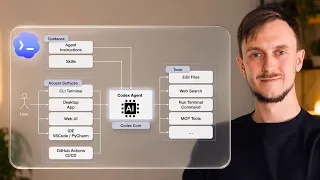 10min
EN
10min
ENLesson 1 – OpenAI Codex Full Course: AI Coding Agent Tutorial with Python Examples
 53min
EN
53min
ENGetting started with Codex
 41min
EN
41min
ENLesson 2 – OpenAI Codex Full Course: AI Coding Agent Tutorial with Python Examples
 1h 43min
EN
1h 43min
ENCodex Full Course 2026: The NEW Best AI Coding Tool
 21min
EN
21min
ENLesson 3 – OpenAI Codex Full Course: AI Coding Agent Tutorial with Python Examples
 32min
EN
32min
ENComplete Beginner’s Guide to OpenAI’s Codex App
 34min
EN
34min
ENLesson 4 – OpenAI Codex Full Course: AI Coding Agent Tutorial with Python Examples
 12min
EN
12min
ENAll Codex CLI Essentials in 12min
 27min
EN
27min
ENLesson 5 – OpenAI Codex Full Course: AI Coding Agent Tutorial with Python Examples
 43min
EN
43min
ENCodex for Everyday Work: AI Agents Beyond Coding
 30min
EN
30min
ENLesson 6 – OpenAI Codex Full Course: AI Coding Agent Tutorial with Python Examples
 11min
EN
11min
ENLesson 7 – OpenAI Codex Full Course: AI Coding Agent Tutorial with Python Examples
 33min
EN
33min
ENFull OpenAI Codex Crash Course for Beginners
 1h 15min
EN
1h 15min
ENFull Workshop: Setting Yourself Up for Success —Jason Liu, OpenAI Codex
 8min
EN
8min
ENOpenAI Codex Tutorial: How to Build a Custom Codex Skill and Publish It on GitHub
 32min
EN
32min
ENFull OpenAI Codex Tutorial for Beginners (no code)! From zero to one!
 18min
EN
18min
ENCodex Tutorial For Beginners: The Complete Crash Course
 8min
EN
8min
ENMaster 90% ChatGPT Codex In 9 Minutes (Use Codex For Free)
 28min
EN
28min
ENHow I Use ChatGPT Work and GPT-5.6 to Do Everything (Beginner Tutorial)
 19min
EN
19min
ENChatGPT Codex vs Traditional Coding – You Need to See This
 9min
EN
9min
ENOpenAI Codex Tutorial #1 – Introduction & Setup
 7min
EN
7min
ENOpenAI Codex in your code editor
Frequently asked questions about OpenAI Codex
How should I start learning OpenAI Codex?
Start with the beginner-friendly tutorials, then follow the path in order. This topic favors practical videos that help you build, configure, or publish something real.
Are these videos current?
The selected tutorials were checked against a 2025/2026 freshness window whenever possible, plus embed availability and social proof.
Does this topic include a free course?
This batch publishes a focused topic and a guided path. A separate course is only created when there is a cohesive course-style playlist or long class worth promoting as a course.
Are the tutorials in English?
Yes. This English topic uses English-language videos and marks both the publication and the videos with the English language taxonomy.
Can beginners use this topic?
Yes. The path starts with beginner-friendly material and then adds intermediate videos when the workflow needs more context.
Why are some videos official and others from creators?
Official videos are useful for product context, while independent tutorials often show practical workflows, mistakes and real project decisions.
How does Cursob choose the video order?
The order starts with setup or overview material, then moves toward hands-on practice, longer classes and more specific workflows.
Should I watch every video?
Use the full path if you are new to the tool. If you already know the basics, jump to the videos that match your current project.
Do I need a paid account for OpenAI Codex?
Some tools may require an account or paid plan for specific features. The topic focuses on learning workflows, not guaranteeing free access to every feature.
How often should this topic be refreshed?
Digital tools change quickly, so the topic should be reviewed when major product updates, pricing changes or new official workflows appear.
How to study OpenAI Codex with context
This initial text is replaced by a specific section generated through the Anthropic/Claude API from the tutorials published in this topic.
Curated learning flow
The selection favors hands-on tutorials, official guidance where useful, and practical workflows over news, speculation, or generic reviews.
Perguntas frequentes sobre OpenAI Codex
How does OpenAI Codex differ from GitHub Copilot in terms of functionality and API access?
OpenAI Codex is the underlying AI engine powering GitHub Copilot, but Codex offers direct API access for custom integrations. While Copilot provides IDE extensions for Visual Studio Code and JetBrains IDEs, Codex API allows you to build tailored coding assistants, CLI tools, and workflow automation systems that match your team's specific development practices and architectural patterns.
What role does prompt engineering play in improving Codex code generation quality?
Prompt engineering directly affects how accurately Codex interprets your intent and generates relevant code. Clear, context-specific natural language instructions yield higher-quality outputs. The more precisely you describe the problem, constraints, and expected behavior in your prompt, the better Codex performs across different programming languages like Python, JavaScript, and SQL, reducing the need for extensive post-generation editing.
How can I leverage Codex CLI for command-line automation workflows?
The Codex CLI brings code generation directly to your terminal, enabling rapid synthesis without leaving the shell environment. After API authentication, you can pass natural language prompts through the command-line interface to generate code snippets, shell scripts, and multi-language translations. This workflow minimizes context-switching and accelerates development cycles for developers who primarily work in terminal-based environments.
What are AI agents in the context of OpenAI Codex, and how do they differ from basic code generation?
AI agents using Codex perform complex multi-step workflows by decomposing tasks into sequential operations. Unlike single-prompt code generation, agents maintain context across interactions, reason about problem requirements, and orchestrate multiple API calls to accomplish sophisticated automation. This capability extends beyond writing code snippets to handling workflow automation, task decomposition, and state management across entire application architectures.
How do temperature and token parameters affect Codex API responses?
Temperature controls the randomness of generated code, with lower values producing more deterministic outputs suitable for production code, while higher values increase creativity for exploratory tasks. Token parameters define response length and complexity. Understanding these settings allows you to balance consistency, code quality, and computational cost when building custom Codex integrations through the OpenAI API.
Can Codex fine-tune itself on domain-specific code to improve generation for specialized contexts?
Yes, you can fine-tune Codex on domain-specific codebases to improve generation quality within specialized development contexts. This approach is particularly valuable for teams working with proprietary architectures, legacy systems, or industry-specific frameworks. Fine-tuning adapts Codex's underlying model to understand your codebase patterns, conventions, and technical requirements, resulting in more contextually appropriate generated code.
What IDEs and development environments offer native Codex integration?
Visual Studio Code and JetBrains IDEs provide native Codex integration through GitHub Copilot extensions. However, the OpenAI Codex API enables integration into virtually any development environment, custom tooling, or editor. This flexibility allows developers to build specialized IDE extensions, command-line tools, and workflow orchestration systems tailored to their specific technology stack and development practices.
How does Codex handle multi-language code translation and cross-language development workflows?
Codex excels at translating code across programming languages by understanding semantic intent rather than syntax. You can describe a function in natural language or provide code in one language, and Codex generates equivalent implementations in Python, JavaScript, SQL, or other languages. This capability is particularly useful for polyglot development teams and modernizing legacy systems written in older languages.
What security considerations should I keep in mind when using Codex API for sensitive code generation?
When generating sensitive code with Codex, carefully control API access through authentication tokens, implement prompt validation to prevent injection attacks, and review generated code before deployment. Avoid including proprietary algorithms or security credentials in prompts. Consider fine-tuning on sanitized domain code rather than production systems, and monitor API usage to detect unusual patterns that might indicate compromised credentials.
How does Codex handle architectural pattern recognition when generating complex multi-file code structures?
Codex understands architectural patterns and can generate code that adheres to common design paradigms like MVC, microservices, and event-driven architectures. By providing context about your system's architecture in prompts, Codex generates code that aligns with existing patterns. However, for complex multi-file structures, decomposing generation into sequential agent steps yields better results than attempting to generate entire architectures in single prompts.
Mastering OpenAI Codex: From Fundamentals to AI-Driven Automation
OpenAI Codex represents a transformative shift in how developers approach software creation, debugging, and automation. Built on GPT-3 technology but specifically trained on publicly available code, Codex bridges the gap between natural language intent and executable code. Whether you're using the Codex app, CLI, or API, understanding its capabilities, limitations, and optimal usage patterns is essential for leveraging AI-assisted development effectively. This topic explores the complete Codex ecosystem, from initial setup through advanced agent-based workflows.
Understanding Codex Architecture and Training
OpenAI Codex builds on large language model foundations, specifically trained on vast repositories of publicly available code from the internet. This training approach gives Codex a unique advantage over general-purpose language models: it understands both programming syntax and semantic meaning across multiple languages. The model can interpret high-level natural language instructions and translate them into functionally correct code implementations. This dual comprehension enables Codex to handle not just simple code generation tasks, but also code review, optimization suggestions, and architectural pattern recognition.
The Codex model's training data encompasses diverse programming languages including Python, JavaScript, SQL, and many others, making it effective across polyglot development environments. However, the quality of generated code depends heavily on the specificity and clarity of your input prompts. Codex performs best when you describe the intended functionality, input parameters, expected output format, and any relevant constraints. Understanding these training characteristics helps developers frame prompts effectively and recognize situations where Codex is most valuable versus where human expertise remains essential.
Codex App Interface and Interactive Workflows
The Codex app provides an accessible interface for developers of all skill levels to explore code generation without managing API authentication or command-line configuration. The app presents a straightforward prompt input field where you describe what code you need, and Codex generates multiple candidate implementations. This interactive environment is ideal for learning how Codex interprets different prompt styles, experimenting with temperature settings to control output variation, and iterating on prompts to achieve desired results. The beginner-focused approach makes the app an excellent starting point before progressing to API-based integrations.
Within the app interface, you can adjust parameters like temperature and token limits to control generation behavior. Lower temperature values produce more deterministic, consistent outputs suitable for production code, while higher values introduce creativity useful for exploratory development. Token parameters define the maximum length of generated responses, affecting complexity and cost. The app's interactive nature allows real-time experimentation with these settings, helping developers develop intuition about which configurations work best for different coding scenarios.
Command-Line Interface Essentials and Terminal Workflows
The Codex CLI brings code generation directly to the terminal, eliminating context-switching between development editors and separate tools. After authentication with your OpenAI API credentials, you pass natural language prompts through shell commands to generate code snippets and complete scripts. This workflow is particularly valuable for developers who work primarily in terminal environments, automating infrastructure tasks, or building deployment scripts. The CLI integrates seamlessly with existing shell scripting, allowing you to pipe output to other commands, redirect to files, and incorporate generation into larger automation workflows.
Setting up Codex CLI involves storing API authentication credentials securely and understanding core command syntax for submitting prompts and handling responses. The CLI supports the same temperature and token parameters as the app and API, giving experienced developers granular control over generation behavior. Advanced usage includes building shell wrapper scripts that prompt users for input, validate generated code, and execute it conditionally based on approval. This approach transforms Codex from a code generation tool into an intelligent assistant deeply integrated into your terminal-based development environment.
Prompt Engineering for Consistent, High-Quality Code Generation
Effective prompt engineering is the cornerstone of reliable Codex usage. Rather than vague instructions like 'write a function', successful prompts include specific details about functionality, input parameters, expected output format, error handling, and any relevant constraints. For example, instead of 'create a sorting function', specify 'write a Python function that sorts a list of dictionaries by the score key in descending order, handling cases where the score key is missing'. This specificity dramatically improves code quality and reduces the likelihood of generating outputs requiring substantial revision. Experienced developers develop a mental library of effective prompt patterns for common scenarios.
Different prompt styles yield different results depending on context. Providing code examples in your prompt helps Codex understand your preferred style and architectural patterns. Describing error conditions explicitly ensures generated code includes appropriate validation and exception handling. Mentioning specific libraries or frameworks you want to use constrains generation toward compatible implementations. Testing multiple prompt variations and analyzing which generate the best outputs builds skill in communicating with Codex. Over time, this iterative refinement process leads to developing prompt templates for recurring code generation tasks.
API Integration for Custom Coding Assistants and Automation
The OpenAI Codex API enables building custom coding assistants tailored to your team's specific development practices, architectural patterns, and technical requirements. Unlike the app or CLI which are general-purpose tools, API integration allows you to create specialized workflows that automatically generate code based on custom triggers, validation rules, and post-processing steps. For example, you could build a system that analyzes code comments in pull requests and automatically generates implementation suggestions, or create a deployment automation tool that generates infrastructure-as-code based on service requirements.
API-based workflows support sophisticated automation patterns including multi-step agent architectures where Codex handles individual generation steps within larger orchestration systems. You can implement feedback loops where generated code is tested, validation errors trigger prompt refinement, and the cycle repeats until acceptable code is produced. This approach is particularly valuable for complex architectural code generation where single prompts struggle to capture requirements. Advanced integrations include building IDE extensions that leverage Codex alongside your codebase, enabling context-aware generation that understands your project's existing patterns and conventions.
AI Coding Agents and Multi-Step Workflow Automation
AI coding agents extend beyond single code generation tasks to perform complex multi-step workflows involving task decomposition, state management, and sequential decision-making. Rather than generating an entire feature in one prompt, agent-based approaches break problems into constituent steps, each handled by a focused Codex prompt. For instance, an agent might first generate a database schema based on requirements, then create data access functions, followed by API endpoints, and finally integration tests. This decomposition improves output quality because Codex can focus on specialized sub-problems rather than attempting to solve entire systems simultaneously.
Building effective agents requires designing clear step boundaries, defining input and output contracts for each step, and implementing mechanisms to validate generated code before progressing to subsequent steps. Agents maintain context across interactions through prompt injection techniques that include previous generation results in subsequent prompts. This approach enables sophisticated automation of entire development workflows, from specification analysis through testing. Real-world agent applications include automating boilerplate code generation for new services, translating legacy code across language migrations, and generating comprehensive test suites alongside production code.
Fine-tuning Codex for Domain-Specific Code Contexts
While Codex performs well on general programming tasks, fine-tuning on domain-specific codebases significantly improves generation quality for specialized contexts. Teams working with proprietary architectures, legacy systems, or industry-specific frameworks can train Codex variants on sanitized examples of their codebase, teaching the model their unique patterns, naming conventions, and architectural approaches. This fine-tuning process transforms Codex from a general assistant into a specialist deeply familiar with your development practices. The improved contextual understanding results in generated code that requires minimal editing and integrates seamlessly with existing systems.
Fine-tuning involves preparing training datasets of your codebase examples, though you must sanitize sensitive data, credentials, and proprietary algorithms before training. The process creates a specialized Codex variant accessible through the API, enabling your team to leverage model improvements immediately. This approach is particularly valuable for organizations with distinctive technical stacks or architectural requirements that differ from typical open-source development. However, fine-tuning requires investment in data preparation and API costs, making it most justified for teams with substantial, ongoing code generation needs.