-
03
 Lesson 3 – Claude Certified Architect – Full Course
32min
Lesson 3 – Claude Certified Architect – Full Course
32min
-
04
Lesson 4 – Claude Certified Architect – Full Course
33min
-
05
Lesson 5 – Claude Certified Architect – Full Course
12min
-
06
Lesson 6 – Claude Certified Architect – Full Course
45min
-
07
Lesson 7 – Claude Certified Architect – Full Course
Current lesson
-
08
Lesson 8 – Claude Certified Architect – Full Course
38min
-
09
Lesson 9 – Claude Certified Architect – Full Course
1h 29min
-
10
Lesson 10 – Claude Certified Architect – Full Course
35min
-
11
Lesson 11 – Claude Certified Architect – Full Course
31min
-
12
Lesson 12 – Claude Certified Architect – Full Course
33min
-
13
Lesson 13 – Claude Certified Architect – Full Course
51min
-
14
Lesson 14 – Claude Certified Architect – Full Course
31min



Summary
The High Stakes of Tool Selection
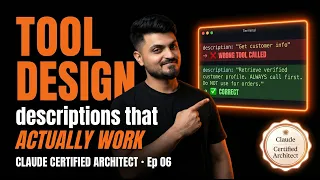
In the architecture of modern AI agents, few design decisions carry as much weight as tool selection. When an agent reaches for an external function, API, or data source, it must choose correctly on the first attempt. A wrong call cascades into corrupted workflows, unreliable outputs, and user distrust. The mechanism governing this choice is not a complex routing classifier or a set of carefully crafted few-shot examples. It is something far simpler and often overlooked: the tool description. This episode of the Claude Certified Architect Full Course centers on Task Statement 2.1, which covers a skill that forms the backbone of productive agentic systems. Designing effective tool interfaces is not merely about writing documentation; it is about shaping the primary lens through which the model interprets its available actions.
The certification exam explicitly tests this understanding in Sample Question 2. Many candidates underestimate the power of a plain-text string, expecting the model to rely more heavily on system prompts or conversation history. In practice, Claude treats tool descriptions as the authoritative source of truth for determining which function to invoke. This makes the interface definition the highest-leverage text an architect can write. A poorly scoped or vaguely written description introduces ambiguity into the decision boundary, leading to the kind of agent misrouting that frustrates users and complicates debugging.
The 5-Component Anatomy of Production-Grade Descriptions
A standard tool definition often feels complete with a name and a basic summary. However, production environments demand a more structured approach. The episode introduces a five-component template that transforms a functional description into a robust interface. The name must be distinctive and self-documenting, avoiding generic verbs that bleed into other tools. The brief summary serves as the model’s first filtering pass, so it needs to declare the tool’s singular purpose without overlap. Detailed parameters with clear type constraints and natural language descriptions prevent the agent from hallucinating arguments. A dedicated section on boundary conditions explicitly states what the tool does not do, carving out a negative space that prevents encroachment on neighboring functions. Finally, a short example invocation grounds the abstract definition in a concrete usage pattern.
These components work together to create a high-contrast signal. Claude processes descriptions as sequences of tokens, and the distinctiveness of those tokens determines how reliably it can distinguish between similar tools. When an architect relies solely on a tool name or a cursory sentence, the resulting embeddings are too close for the model to separate reliably. This is how overlapping descriptions cause the misrouting problem that plagues so many early-stage agents.
Understanding the Agentic Overlap Problem
The description overlap problem emerges when two tools share vocabulary, purpose, or domain language. Even subtle similarities in phrasing can create a semantic neighborhood where the model struggles to pick the correct resident. For instance, a system with separate tools for searching internal documentation and querying a public knowledge base may use the verb “fetch” in both descriptions. When Claude encounters a request to fetch information, the identical terminology offers no clear tie-breaker, leaving the model to guess based on context or recency bias. The outcome is frequent misrouting, which manifests as the agent calling the public search tool when it should be reading internal docs, or vice versa.
The fix often requires only three sentences of revision, as the episode emphasizes. By sharpening the language to highlight differing inputs, outputs, or data sources, the architect restores the boundaries between tools. This surgical precision is more effective than writing elaborate routing logic or adding extra classification layers. The model simply needs to see a clear difference in the tool signatures to make reliable decisions. This principle extends beyond pairs of tools to entire suites, where each new capability must integrate without blurring existing definitions.
Strategic Refactoring Through Renaming and Splitting
Sharpening descriptions works for moderate overlap, but sometimes the friction signals a deeper architectural flaw. The course addresses two advanced techniques for resolving classification deadlocks: renaming and splitting. Renaming is the simpler intervention. If two tools share a functional domain but operate on different data sources, a name change can encode that distinction directly into the selection signal. Generic names like "get_data" or "run_query" force the model to rely entirely on the description body, while specific names like "fetch_customer_record" or "search_knowledge_base" create immediate disambiguation at the name-matching level.
Tool splitting addresses the more fundamental issue of a single interface trying to serve multiple purposes. A tool named "process_document" that performs summarization, translation, and entity extraction is destined for internal confusion. The model cannot map a user’s request for translation onto a distinct tool when the available interface presents a bundle of unrelated capabilities. Splitting the multifunctional tool into three focused tools gives each operation a dedicated descriptive surface, eliminating the ambiguity entirely. This creates more tools in the registry, but the trade-off is a dramatic improvement in routing accuracy and the legibility of the agent’s decision trace.
How System Prompts Skew Selection Unintentionally
Tool descriptions are the primary mechanism for selection, but they do not operate in a vacuum. The system prompt introduces a powerful context that can bias the model toward specific tools, sometimes without the architect’s awareness. When a system prompt instructs the agent to "be helpful and thorough, using available tools whenever appropriate to reduce user effort," it may inadvertently steer the model toward tools that seem more comprehensive, even if they are not the correct fit for the request. A bias toward a "run_advanced_analysis" tool over a simpler "fetch_stats" tool can emerge simply because the prompt encourages thoroughness.
The episode walks through how to audit system prompts for these unintended selection biases. A prompt that names a specific tool, highlights a particular capability, or prioritizes a style of response creates a gravity well that distorts the model’s reading of the descriptions. The solution is to keep system prompts behaviorally focused rather than tool-aware. Describing the agent’s role and output preferences without referencing specific tools keeps the selection decision grounded in the tool definitions themselves.
Applying the Principles to Sample Question 2
The course ties these concepts directly to the certification exam with a full walkthrough of Sample Question 2. The question presents a scenario of an agent misrouting requests and asks candidates to identify the most likely cause from four distractors. The walkthrough systematically eliminates answers that blame the model’s reasoning quality, the complexity of the request, or the number of tools available. The correct answer focuses on the overlapping language in the tool descriptions, reinforcing the episode’s central thesis that description clarity is the root of tool selection reliability.
Each distractor is explained in terms of the underlying architectural principle it tests. One distractor suggests improving the system prompt, which the episode’s earlier analysis of system prompt bias reveals as a potential trap rather than a solution. Another recommends adding a dedicated routing classifier, feeding the common misconception that AI agents require complex preprocessing layers to function correctly. By the end of the walkthrough, the architectural pattern is unmistakable: design the tool interface as if it were the only documentation the model will ever read.
The Certification Context and Real-World Impact
Task Statement 2.1, which covers the content of this episode, accounts for 18% of the Claude Certified Architect Foundations exam. This weighting reflects Anthropic’s emphasis on tool design as a foundational architect competency, not an operational detail. For practitioners building multi-agent systems, the principles taught here define the difference between brittle prototypes and production-grade orchestration. When tool descriptions are treated as first-class design artifacts, every other layer of the agent stack becomes simpler. Debugging sessions shift from tracing mysterious misrouting to refining a few lines of clear text. The result is not merely exam readiness, but a permanent upgrade in how technical teams conceive of agent interfaces.
What you will learn
- Understand why tool descriptions are the primary mechanism for Claude's tool selection
- Apply the 5-component template for writing production-grade tool descriptions
- Diagnose and resolve tool misrouting caused by description overlap
- Decide when to rename versus split tools for cleaner agent interfaces
- Identify how system prompt wording creates unintended tool selection bias
- Analyze exam-style tool design scenarios including all four distractors
Concepts covered
Technologies used
Chapters 10 markers
Next suggested video


Reviews
No reviews yet. Be the first to rate this lesson.